Colasoft Ping Tool is a Windows-based ping utility provided by Colasoft Capsa Free Network Analyzer. With Colasoft Ping Tool, you can ping a single IP or domain name, or ping multiple IPs and domain names at the same time. If you enter multiple addresses, separate each by a space, then click the "Start Ping" button on the right side of the input box to initiate the operation for all entered IPs or domain names. After Ping starts, the "Start Ping" button will automatically change to "Stop Ping".
Now the Ping Tool has been integrated into the latest version of Colasoft Capsa Free Network Analyzer, enabling you to get five free network analysis tools with a single installation.
| File Size | 149 MB |
| Release Date | 08/07/2024 |
| Latest Version | 2.1 |
| Requirements | Windows 2000/XP/2003/Vista/7/8/10/11 |
| License Type | Freeware |
| Limitations | No limitations |
User Guide
Colasoft Ping Tool displays the operation and the statistic results of ping with three windows.
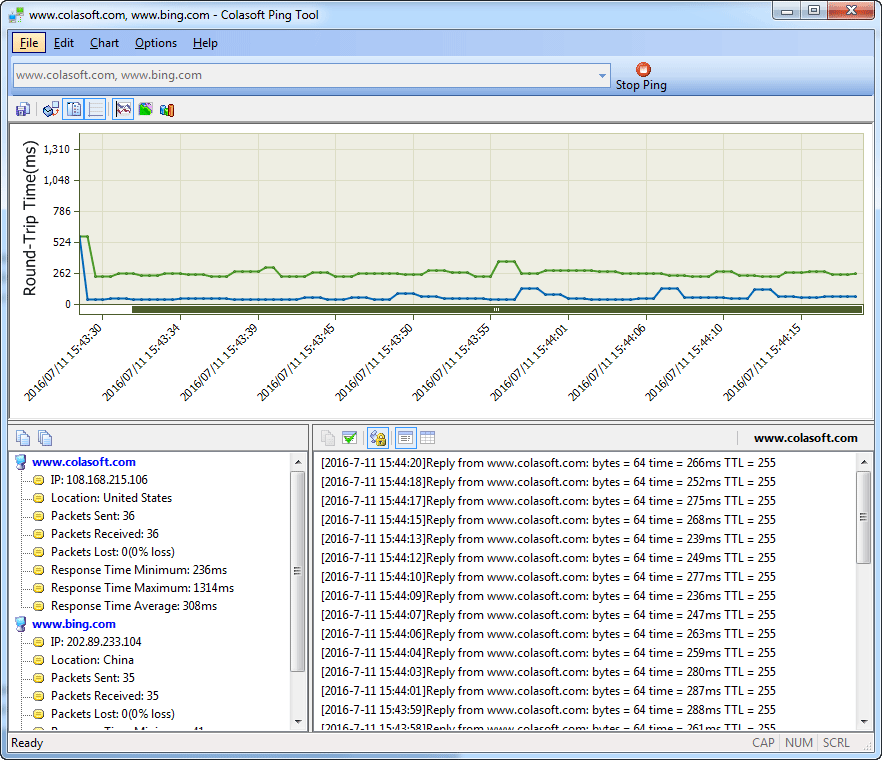
- Graphic window:
The Graphic window of Colasoft Ping Tool at the upper place is used to display the secular trend of ping time. It reveals every single ping command in a graphic way. The X axes indicate the real ping time while the Y axes indicate the ping response time. - Ping - Summary:
The Ping Summary window provides basic information such as IP address, location, packets received/sent/lost, as well as response time of all required IP addresses or domain names. - Ping - Details:
The Ping Detail window displays all the detailed information of ping execution. The Ping Detail window will displays the corresponding ping results when selecting an IP address or domain name in the ping. Colasoft Ping Tool has two kinds of display types: classical and list. The classical display view is the same as the output of windows ping. The list display view is the display format of Colasoft, it lists TimeStamp(in second), Status, Bytes, Response Time and TTL.
Ping one address/domain
Colasoft Ping tool will highlight the specific node and node border upon it. An annotation will automatically popup which contains the domain name and response time. The response time in the annotation will be a range of time when the mouse cursor puts on the grid, while it will be a time if the mouse cursor puts on the grid line.
Ping multiple addresses/domains
Colasoft Ping tool allows pinging multiple IP addresses and domain names at one time without upper limit of the addresses' number. Enters IP addresses and domain name into the address pane, separate each other with a blank space, comma or semicolon, then clicks the Start Ping button to execute ping command.