nChronos is an application centric, deep-dive network performance analysis system. It combines the nChronos Console with the nChronos Server to deliver the capability of 24x7 continuous packet capturing, unlimited data storage, efficient data mining and in depth traffic analysis solution. nChronos captures 100% of all data captured for real-time analysis as well as historical playback.
Overview
nChronos is designed for monitoring the network traffic in medium and large corporates. It connects to company's core router or switch and monitors all network traffic, emails and chat sessions inbound and outbound. Also, it provides the ability to monitor abnormal traffic and alert upon detection of "Suspicious Conversations". Only when network engineers monitor network activities of the entire network at the packet level are they able to identify abnormal network activities and protect their companies from cyber-crime and cyber-attacks.
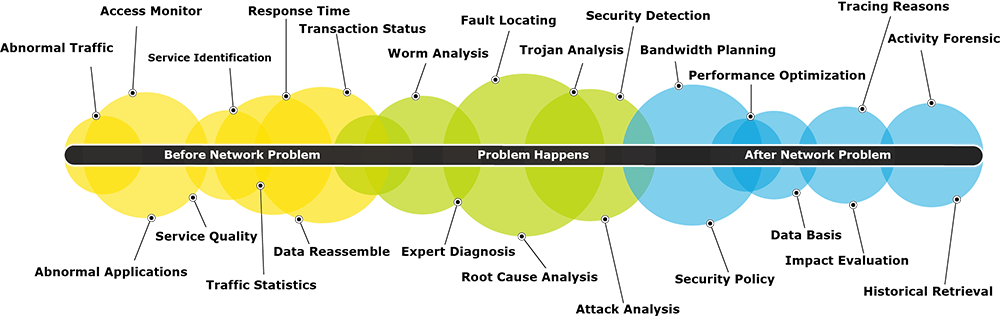
nChronos can not only alert an Cyber Attack, but also record all packet data. This ability helps network engineers to "rewind" and "replay" the actual network activity when it occurs. Companies have video cameras to monitor who physically enters their business afterhours, now with nChronos network engineers can monitor and record data activity in a similar manner. The time has come where theft of company assets and intellectual property from data streams and network activity is the greater threat. With a relatively minor investment, nChronos provides an insight and deep packet analysis of all network activity.
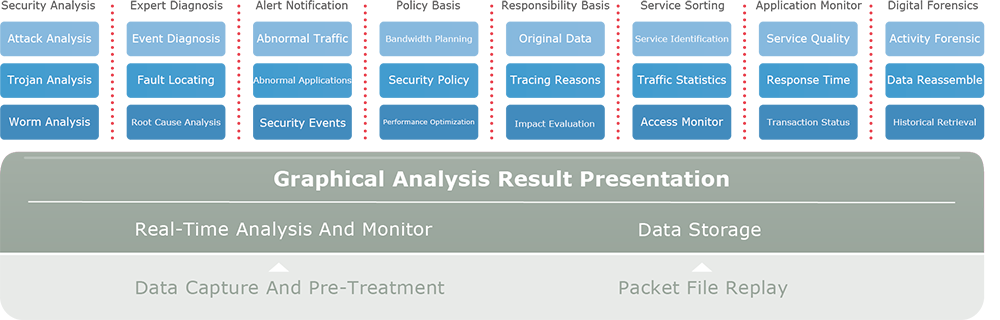
nChronos Console
Provides quick access to all distributed deployed nChronos Servers where packets are stored, it serves as the center of the enterprise network management which is capable of visualizing the overall enterprise network activities, drilling down to isolate performance issues and troubleshooting high-priority and critical network issues.
nChronos Server
Performs 7x24 real-time packet capturing and continually store to hard disk for quick packets and statistics retrieval. With flexible and non-intrusive deployment with standard network mirror port or link tap technologies, it provides native packets for the Console to go back in time and complete retrospective network analysis.
Features
24x7 Real-time Network Traffic Capturing and Recording

nChronos offers real-time capturing, analyzing, and storing sustained traffic at Gigabit line rates for all data flows and packets. nChronos also provides scalable extensive storage capacity varies from 1TB to unlimited storage to meet the customizable network requirements and assure the long-term traffic storage for critical links.
Retrospectively Analyze Historical Traffic

nChronos can fast retrieve the traffic packets at any time period (real-time or retrospective), and simultaneously drill down for data-mining and full analysis. nChronos helps network users to quickly pinpoint, analyze, and resolve network and application problems, detect the attacks and threats, efficiently and in-depth analyze the network activities. By back-in-time network analysis, nChronos can efficiently solve the network interruption issues.
Real-time Network Monitoring

nChronos offers real-time network statistics, including total bytes, total packets, bandwidth utilization, top IP talkers and top application talkers. With the Real-time statistics, network administrators can instantly understand the current pattern of the network. For example, when the network gets slow, network administrators can log on to nChronos right away and see which hosts are the top talkers, and what applications are consuming the most bandwidth.
Statistical Reports

nChronos provides both system and user-defined reports. The System Reports include global report, traffic reports, protocol distribution report, application performance and transaction report, alarm reports and top talkers reports. All reports can be configured to provide actual statistics of the traffic and analysis data in specified time period, as well as the comparison to historical statistics, to thereby provide better references for network administrators. Reports can be sent to specified email recipients. Users can schedule hourly, daily, weekly and monthly reports.
Benchmark and Visualize Trends of Network Performance

Based on the long-term network traffic capture and analysis data, nChronos visualizes the statistics in trend charts to help IT stuff establish baseline for the entire network, and get hold of the trend of the network operations in long-term running, identify and pinpoint network problems, acquire the evidence for decision-making on network policies, and reinforce the overall technical level for network management as well as the ability to solve network issues.
Critical Links Monitoring & Alerting

nChronos offers visualized entire network traffic monitoring . By long-term traffic monitoring and visualizing network critical links behaviors and network traffic patterns, nChronos helps users to create a network baseline, setup online triggered alerts for network events for warning and preventing network outrages. With nChronos, there will be no critical events missed on critical links.
Efficient Drill-down for Data-mining & Index

nChronos provides efficient data retrieving and drilling down over any time period for hours, days, or weeks with accurate time stamp. It offers complete access to application level traffic flows, network statistics and data links information across all seven OSI layers level. This powerful framework can greatly reduces the time of identifying root-cause and resolving the problem.
Application Performance Analysis

One of the most critical requirements of management software is the ability to monitor and record detailed application activity. nChronos can define custom application monitoring functions as well as transaction monitoring based on the application data. Then the custom application and transactions capability of nChronos enables the network administrator to view the detailed traffic status and statistics of the application or the transactions.
In-depth Network Analysis for Performance Optimization

nChronos offers powerful ability for application-oriented analysis. The various Analysis Profiles include High-performance Analysis, Full Analysis, HTTP Analysis, high-level FTP Analysis, Email Analysis, DNS Analysis, etc., helping IT professionals to conduct in-depth network analysis with less MRRT (Mean Time to Repair) and optimize the entire network performance so as to increase enterprise network productivity.
Case Study


System Requirements
| nChronos Standard Technical Specifications | |
|---|---|
| Specification | Details |
| Maximum logical links | 4 |
| Capture interfaces | 8 |
| Analysis performance | Up to 100,000 Mbps |
| Type of media supported | • 10/100/1000/10000 Base-T • 0000 Base-SX/LX/ZX |
| Storage capacity | Depends on hard disk space |
| Support TAP | Yes |
| Concurrent connections to server | 2 |
| Note | To have an analysis performance of 100,000 Mbps, professional capture cards are necessary. |
| System Requirements for nChronos Server | |
|---|---|
| Component | Minimum Requirements |
| Operating System | openEuler22.03, Rocky Linux8.9, Redhat8.6, CentOS Linux 7.9 |
| CPU | 10-core, 2.2GHz |
| RAM | 64GB |
| Hard disk | At least two disk(physical or logical) with free space of at least 32TB |
| Network interface | At least 2 network interfaces |
| Note | Depending on network traffic and analysis performance required, the requirements may be substantially higher. Factors that contribute to superior performance include high speed CPU, RAM, and high performance disk storage subsystem, and enough hard disk space is required to store network packets and data that you want to have. |
| System Requirements for nChronos Console | ||
|---|---|---|
| Component | Minimum Requirements | Recommended Requirements |
| Operating System | Windows 7/8/10/Server 2008/2012/2016/2019 | |
| CPU | Dual-core processor | 4-core processor |
| RAM | 8GB | Above 8GB |
| HD space | 100GB | 1TB |
| Management interface | Independent network adapter | |
| Browser | Chrome 50+, Firefox 63+ | |
Deployment
- Study your network topology and find the perfect place from where you want to capture traffic you need. The core switch (a managed switch) is the perfect choice, which enables you to capture all data on the switch, and a hub or Tap works for data capture as well.
- Read System Requirements (both nChronos server and console) to prepare a server and a machine for console.
- Install nChronos server on the server machine and activate it.
- Follow step-by-step guide to initiate nChronos server, and create a network monitoring session.
- Install nChronos console on the machine, and activate it.
- Add a server connection information, and connect to the server to view monitoring data on the server.
Read Getting Started Guide for more details.
Appliance
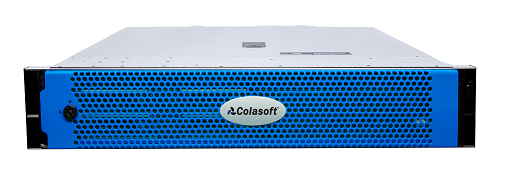
Technical Specification
| nChronos Appliance | Small/Mid-size Office | Large Office or ISP | ||||
|---|---|---|---|---|---|---|
| Series | 1000 Series | 2000 Series | 2500 Series | 3500 Series | 5500 Series | 7600 Series |
| Profile | 1U | 1U | 2U | 2U | 2U | 4U |
| Throughput* | 1Gbps | 2Gbps | 5Gbps | 10Gbps | 20Gbps | 40Gbps |
| Max Conversation Capacity | 250,000/s | 250,000/s | 400,000/s | 600,000/s | 1,000,000/s | 2,000,000/s |
| Max pps | 2,000,000pps | 2,000,000pps | 3,000,000pps | 6,000,000pps | 10,000,000pps | 15,000,000pps |
| HDD | 4TB | 16TB | 32TB | 64TB | 96TB | 192TB |
| Capture Ports | 2 or 4 | 6 | 6 | 4 or 6 | 4 or 8 | 2 or 4 or 8 |
| Power(redundant) | 600W | 600W | 800W | 750W | 800W | 1500W |